Magic Cup at a glance
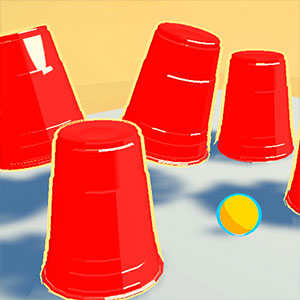
Watch the ball being covered, follow its cup through the shuffle, then choose the correct cup after the movement stops.
Choose the ball's cup correctly through successive stages as the shuffle becomes faster and longer.
How to play Magic Cup
- 01
Select Tap to Begin and note which cup covers the ball.
- 02
Follow that cup through every swap without choosing while the cups are still moving.
- 03
When prompted, tap or click the cup hiding the ball. A correct choice advances the stage; a wrong choice ends the round.
Controls & devices
- Computer
- Click Tap to Begin, then click one cup after the shuffle stops.
- Phone or tablet
- Tap to begin and tap the chosen cup when the prompt appears.
Use an up-to-date browser. Device support varies by game; follow any screen-orientation instructions.
Tips for Magic Cup
Track the cup that holds the ball, rather than trying to remember the movement of all three cups.
- Keep your eyes on the tracked cup when two cups cross.
- Wait for the selection prompt; the game enables cup choices after shuffling.
- Use the first few rounds to settle into the movement before the speed increases.
Selecting the wrong cup reveals the ball and opens the result screen. Use Tap to Replay to start a new round.
Magic Cup: questions & answers
What is the goal in Magic Cup?
Choose the ball's cup correctly through successive stages as the shuffle becomes faster and longer.
What should I watch out for?
Selecting the wrong cup reveals the ball and opens the result screen. Use Tap to Replay to start a new round.
What happens when I press Play?
A full-window player connects to an independently hosted version of Magic Cup. Use Back to return to this guide. The provider page and game assets may take time to load.
Does saving a game save my progress?
Save game bookmarks this listing in your current browser. The provider handles game progress separately. Clearing browser data or using a private session can affect both features.
What if the game does not work?
Check the provider’s instructions, try one reload, or choose a related game. Browser and device compatibility vary. Report a problem with your device, browser and page URL.